CheckoutPage
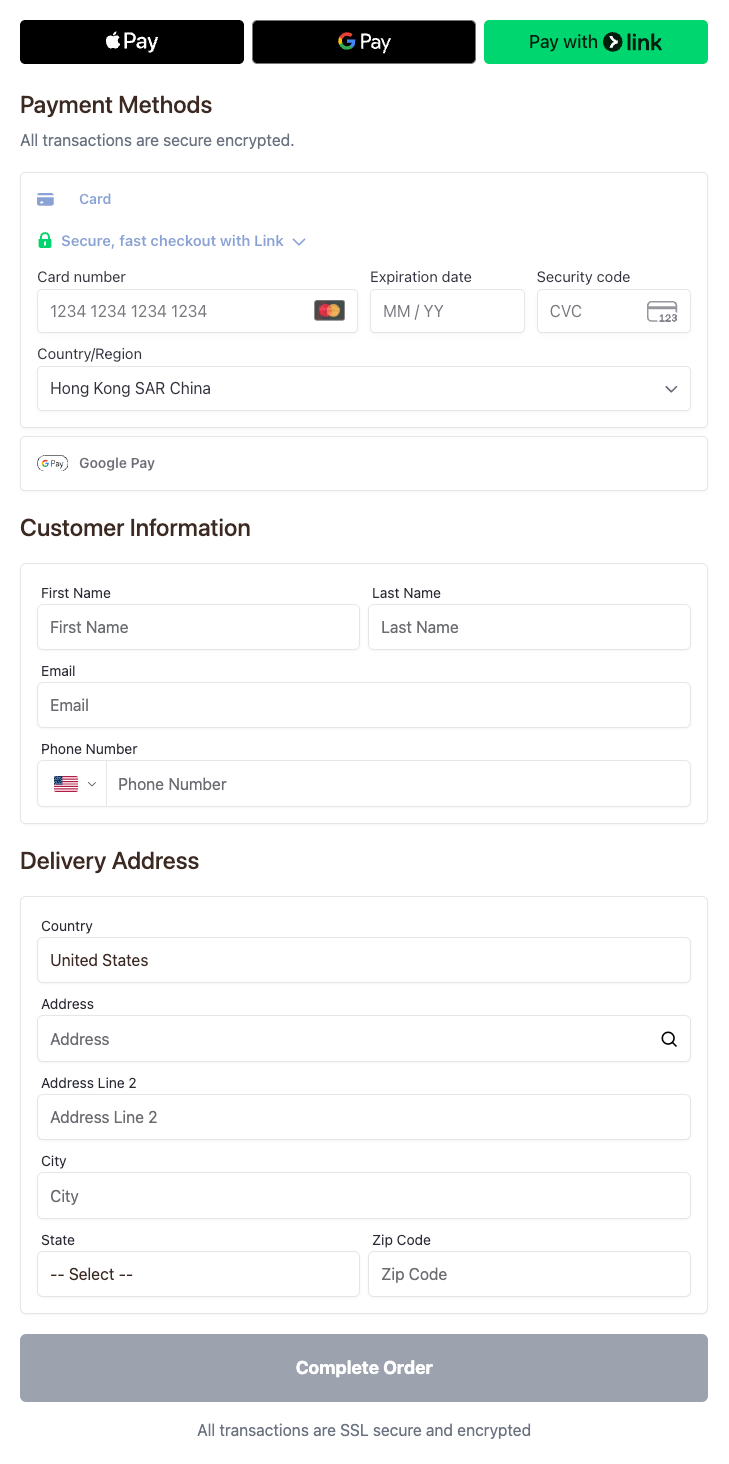
A complete checkout page component that integrates express checkout, customer information, delivery address, payment methods, and order submission functionality.
Props
googleApiKey
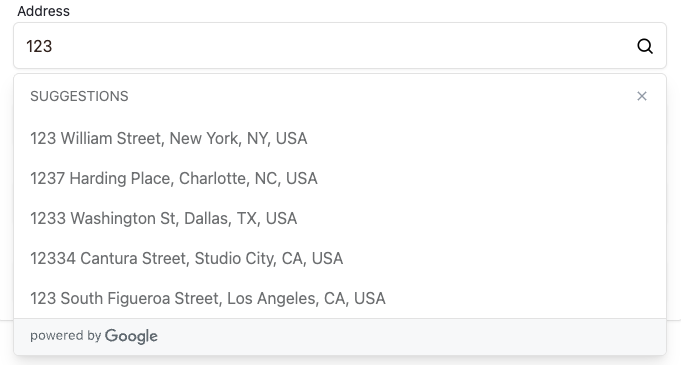
Google Places API Key for enabling address autocomplete functionality. When provided, the address input field will support Google Places suggestions.
The API key must meet the Google Places API requirements.
googleApiKey?: stringonPaymentInfoComplete
Callback function when payment information is complete, triggered when the user completes the payment form and payment element validation passes.
onPaymentInfoComplete?: (products: CheckoutCartItem[], totalAmount: number) => void| Parameter | Type | Description |
|---|---|---|
| products | CheckoutCartItem[] | Cart items array. Returns an array of cart items. |
| totalAmount | number | Total payment amount in cents (e.g., 9999 represents $99.99). For multiple items, this is the sum of all items |
onOrderSubmit
Callback function when order is submitted, triggered after the user clicks the submit button and before order creation begins.
onOrderSubmit?: (products: CheckoutCartItem[], totalAmount: number, setMetadata: (metadata: Record<string, string>) => void) => voidParameter Description:
| Parameter | Type | Description |
|---|---|---|
| products | CheckoutCartItem[] | Submitted cart items array. |
| totalAmount | number | Total amount at submission time in cents (e.g., 9999 represents $99.99) |
| setMetadata | (metadata: Record<string, string>) => void | Function to dynamically set metadata for the order.
• Merges with metadata passed via CheckoutProvider metadata prop • Can be retrieved through orderDetail |
onOrderCreated
Callback function when order is created, triggered after the order is successfully created.
onOrderCreated?: (orderCode: string) => voidParameter Description:
| Parameter | Type | Description |
|---|---|---|
| orderCode | string | Order code |
onOrderSuccess
Callback function when order succeeds, triggered after the payment is successfully processed.
onOrderSuccess?: (orderCode: string, tradeCode?: string) => voidParameter Description:
| Parameter | Type | Description |
|---|---|---|
| orderCode | string | Order code |
| tradeCode | string | Trade code (optional) |
styles
Custom CSS styles to apply to the component. The styles will be added to the CheckoutPage container.
styles?: React.CSSPropertiesshowExpressButtons
Whether to display express payment buttons.

showExpressButtons?: booleanonExpressButtonClick
Callback function triggered when an express payment button is clicked.
onExpressButtonClick?: (event: StripeExpressCheckoutElementClickEvent) => voidParameter Description:
| Parameter | Type | Description |
|---|---|---|
| event | StripeExpressCheckoutElementClickEvent | Stripe express checkout element click event |
onExpressButtonConfirm
Callback function triggered when express payment is confirmed.
onExpressButtonConfirm?: (event: StripeExpressCheckoutElementConfirmEvent) => voidParameter Description:
| Parameter | Type | Description |
|---|---|---|
| event | StripeExpressCheckoutElementConfirmEvent | Stripe express checkout element confirm event |
Usage Examples
import { CheckoutPage, CheckoutProvider, ClickarooProvider } from '@clickaroo/checkout-ui';

function App() {
  const cart = [
    {
      sku: "TEST001",
      offerPricePoint: "OPP-TEST001",
    }
  ];

  return (
    <ClickarooProvider>
      <CheckoutProvider
        baseUrl="https://api.clickaroo.io"
        cart={cart}
        onCheckoutInit={() => {
          console.log('Checkout initialized');
        }}
      >
        <CheckoutPage
          googleApiKey={YOUR_GOOGLE_API_KEY}
          showExpressButtons={true}
          styles={{
            padding: '20px',
          }}
          onPaymentInfoComplete={(products, totalAmount) => {
            console.log('Payment info complete');
            console.log('Total amount:', totalAmount / 100);
            products.forEach((product) => {
              console.log('Product SKU:', product.sku);
              console.log('Unit price:', product.priceInCents / 100, product.currency);
              console.log('Quantity:', product.quantity);
              console.log('Payment type:', product.paymentType);
            });
          }}
          onOrderSubmit={(products, totalAmount, setMetadata) => {
            console.log('Order submitted');
            console.log('Total amount:', totalAmount / 100);
            // You can also dynamically update metadata here
            setMetadata({
              orderSource: 'web',
              timestamp: new Date().toISOString(),
            });
          }}
          onOrderCreated={(orderCode) => {
            console.log('Order created:', orderCode);
          }}
          onOrderSuccess={(orderCode, tradeCode) => {
            console.log('Order successful', orderCode, tradeCode);
          }}
          onExpressButtonClick={(event) => {
            console.log('Express button clicked', event);
          }}
          onExpressButtonConfirm={(event) => {
            console.log('Express payment confirmed', event);
          }}
        />
      </CheckoutProvider>
    </ClickarooProvider>
  );
}
Key Types
CartItem
CartItem is the basic cart item type passed to the CheckoutProvider component:
interface CartItem {
  // Required fields
  sku: string;
  offerPricePoint: string;

  // Optional fields - allows any custom fields, which will be saved to order metadata
  [key: string]: unknown;
}| Field | Type | Description |
|---|---|---|
| *sku | string | Product SKU |
| *offerPricePoint | string | Price Point ID |
| Other fields | unknown | You can pass any additional fields (such as title, price, image, etc.), which will be saved to the order's metadata and can be retrieved through useOrderDetail |
CheckoutCartItem
CheckoutCartItem is the cart item type returned in callback functions, extending CartItem and including price details:
interface CheckoutCartItem extends CartItem {
  // Inherits all fields from CartItem (sku, offerPricePoint, etc.)
  priceInCents: number;
  currency: string;
  quantity: number;
  paymentType: "one-time" | "subscription";
}| Field | Type | Description |
|---|---|---|
| priceInCents | number | Unit price in cents (e.g., 9999 represents $99.99) |
| currency | string | Currency type (e.g., "USD", "EUR") |
| quantity | number | Quantity |
| paymentType | "one-time" | "subscription" | Payment type: "one-time" for one-time payment, "subscription" for subscription payment |
StripeExpressCheckoutElementClickEvent
Event object passed to onExpressButtonClick callback:
export interface StripeExpressCheckoutElementClickEvent {
  elementType: 'expressCheckout';
  expressPaymentType: ExpressPaymentType;
  resolve: (resolveDetails?: ClickResolveDetails) => void;
  reject: () => void;
}
export type ExpressPaymentType =
  | 'google_pay'
  | 'apple_pay'
  | 'amazon_pay'
  | 'link'
  | 'paypal'
  | 'klarna';
export type ClickResolveDetails = {
  lineItems?: Array<LineItem>;
  shippingRates?: Array<ShippingRate>;
  applePay?: ApplePayOption;
};
export type ShippingRate = {
  id: string;
  amount: number;
  displayName: string;
};| Field | Type | Description |
|---|---|---|
| elementType | 'expressCheckout' | The type of element that emitted this event |
| expressPaymentType | ExpressPaymentType | The payment method associated with the button that was clicked |
| resolve | (resolveDetails?: ClickResolveDetails) => void | Call this function to proceed with the express payment. You can optionally pass resolveDetails to configure payment details (line items, shipping rates, etc.). Must be called within 1 second of the click event |
| reject | () => void | Call this function to cancel the express payment flow. Must be called within 1 second of the click event |
StripeExpressCheckoutElementConfirmEvent
Event object passed to onExpressButtonConfirm callback:
export interface StripeExpressCheckoutElementConfirmEvent {
  paymentFailed: (payload?: {
    reason?: 'fail' | 'invalid_shipping_address' | 'invalid_billing_address' | 'invalid_payment_data' | 'address_unserviceable';
    message?: string;
  }) => void;
  billingDetails?: BillingDetails;
  shippingAddress?: ShippingAddress;
  shippingRate?: ShippingRate;
  expressPaymentType: ExpressPaymentType;
}
export type BillingDetails = {
  name: string;
  email?: string;
  phone?: string;
  address: ExpressCheckoutAddress;
};
export type ShippingAddress = {
  name: string;
  address: ExpressCheckoutAddress;
};
export type ExpressCheckoutAddress = {
  city: string;
  state: string;
  postal_code: string;
  country: string;
  line1: string;
  line2: string | null;
};
export type ShippingRate = {
  id: string;
  amount: number;
  displayName: string;
};| Field | Type | Description |
|---|---|---|
| *paymentFailed | (payload?: {...}) => void | Callback when a payment is unsuccessful. Optionally, specifying a reason will show a more detailed error in the payment interface |
| billingDetails | BillingDetails | Billing details |
| shippingAddress | ShippingAddress | Shipping address |
| shippingRate | ShippingRate | Shipping rate |
| expressPaymentType | ExpressPaymentType | The payment method type |
Important Notes
The CheckoutPage component must be wrapped with CheckoutProvider (which requires a baseUrl prop) and ClickarooProvider at the root level.